
Quick Answer
The Rain Design mStand ($49) is the best home office laptop stand — solid aluminum, excellent cooling, and a fixed-height design that works for most standard desk setups. For travel, the Nexstand K2 ($30) is the best portable option: 12 height settings, 310g, folds flat. Both require pairing with an external keyboard. According to NIOSH ergonomics research, neck flexion from working on a flat laptop is a leading cause of neck pain in remote workers.
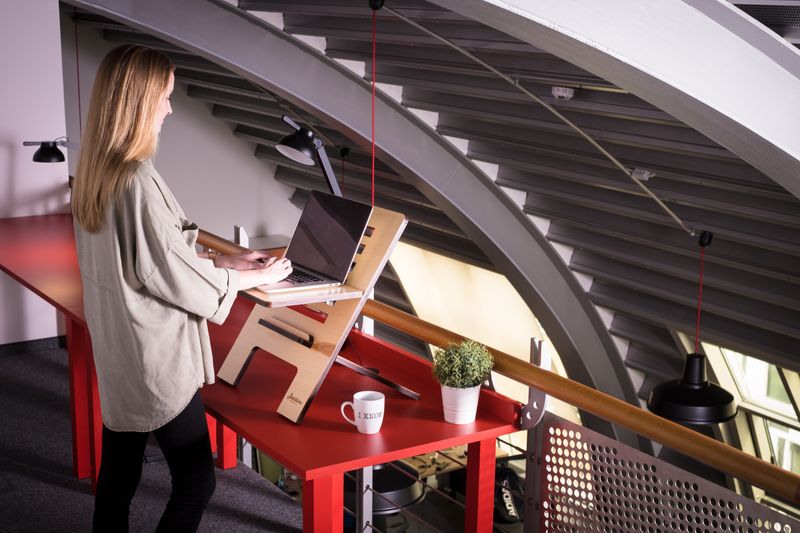
Laptop users face a fundamental ergonomic trade-off: if the screen is at a comfortable viewing height, the keyboard is too high; if the keyboard is at the right height, the screen is too low. The only correct solution is to elevate the laptop screen to eye level using a stand and use an external keyboard and mouse.
This isn't a luxury — it's the difference between building cumulative neck and shoulder strain every day versus working without it. A laptop stand plus a $50 keyboard is a $80 total investment that addresses one of the most common remote worker health problems.
Best Laptop Stands 2026: Top Picks
1. Rain Design mStand — Best Fixed-Height Home Office Stand
The Rain Design mStand is the benchmark laptop stand for home offices. It's solid brushed aluminum that looks clean on any desk, has a cable management channel, and elevates most laptops to approximately monitor-viewing height for average-height users. The cable channel routes USB and power cables out of sight. It runs warm when the laptop is under heavy load (the metal conducts heat from the laptop bottom), but this is fine for normal use. Fixed height — not adjustable — works for most seated desktop setups.
Check current prices on Amazon
2. Nexstand K2 — Best Portable Laptop Stand
The Nexstand K2 is the best portable laptop stand for remote workers and travelers. It weighs 310 grams, folds completely flat (fits in any laptop bag), adjusts between 12 height positions from 19–36 cm, and supports up to 17-inch laptops with a weight limit of about 5 kg. At $25–30, it's also the best-value laptop stand on the market. The plastic construction feels less premium than aluminum stands, but the stability is genuinely adequate for full-day work sessions. Highly recommended for anyone who works from multiple locations.
Check current prices on Amazon
3. Roost Stand — Best Ultra-Light Travel Stand
The Roost Stand weighs just 166 grams — lighter than most mechanical keyboards are by a margin. It uses a clever folding mechanism that packs to pencil size and supports up to 4.5 kg. At $75–$95, it costs 3x the Nexstand K2 for the weight savings. Worth it for frequent flyers or ultralight travel setups; overkill for most users who commute by car. Excellent build quality; made in the USA.
4. Ergotron LX Laptop Arm — Best Desk-Mount Laptop Arm
For permanent desktop setups where adjustability is critical (height, angle, distance), the Ergotron LX Laptop Mount Arm provides a gas-spring adjustable arm that holds the laptop at precisely the right height and allows it to be pushed away when not needed. Requires a laptop tray attachment and works best with laptops up to 4.5 kg. At $120–$150, it's the premium option for a fixed workstation — overkill for most users but ideal for anyone who needs to quickly shift between sitting and standing desk heights throughout the day.
What to Look for in a Laptop Stand
- Height: Should bring the laptop screen to eye level when you're sitting with correct posture. For most users, this is 20–30 cm of lift.
- Stability: The stand should not rock or slide when you type (if you're occasionally using the built-in keyboard).
- Ventilation: Stands that elevate the laptop's bottom create better airflow — important for preventing thermal throttling during heavy use.
- Cable access: Ports shouldn't be obstructed by the stand. Most stands leave the sides of the laptop accessible.
- Laptop size compatibility: Most stands support 11–17 inch laptops, but verify your laptop size fits the stand's grips or tray.
The OSHA computer workstation guidance specifically addresses laptop use: laptops used as primary workstations should be elevated to monitor height with an external keyboard, as the built-in configuration creates unavoidable ergonomic compromise.
For complete workstation setup once your laptop is elevated, see our ergonomic keyboard guide and full workstation setup guide. If you're also evaluating a monitor arm for a secondary screen, our best monitor arms guide covers single and dual options.
Frequently Asked Questions
What is the best laptop stand for a home office?
The Rain Design mStand ($49) is the best fixed-height laptop stand for home office use — solid aluminum construction, excellent heat dissipation, and clean desk aesthetics. For adjustable height, the Nexstand K2 ($30) folds flat for travel but adjusts to monitor height at your desk. Both require using an external keyboard and mouse to maintain ergonomic positioning once the laptop is elevated.
Do I need an external keyboard if I use a laptop stand?
Yes — once you elevate your laptop screen to eye level on a stand, the built-in keyboard is too high to type on comfortably. An external keyboard (and mouse) is required to maintain proper ergonomic positioning. This is the correct ergonomic setup for laptop users: laptop on stand at eye level, external keyboard and mouse at elbow height. Budget $30–100 for a good external keyboard.
What is the best portable laptop stand for travel?
The Nexstand K2 is the best portable laptop stand for travel — it weighs 310 grams, folds to fit in a laptop bag, adjusts between 12 different height positions, and supports laptops up to 17 inches. The Roost Stand is another excellent option: lighter at 166 grams but higher cost ($75–$95). Both are genuinely usable for extended work sessions, not just short coffee shop stints.
Why is working on a laptop flat on a desk bad for you?
Using a laptop flat on a desk forces a trade-off: if the keyboard is at the right height for your elbows, the screen is too low and you bend your neck down 30–45° for hours. Research shows that sustained neck flexion beyond 20° significantly increases strain on the cervical spine. A laptop stand elevates the screen to eye level, eliminating this neck flexion — but requires an external keyboard to maintain correct arm position.
Get weekly guides from ErgonomicOffice
No spam. Unsubscribe anytime.