
⚡ Quick Answer
The Grovemade Wool Felt Desk Pad (~$90) is the best premium desk mat — premium materials, beautiful craftsmanship, and long-lasting build. For everyday value, the Logitech Desk Mat (~$35) is the go-to pick with a smooth tracking surface, stitched edges, and cable routing channels. Budget-conscious? The YSAGi Large Desk Mat (~$18) gives you full-desk coverage without spending much. A desk mat protects your desk surface, improves mouse tracking consistency, and reduces wrist fatigue — every ergonomic home office setup benefits from one.
A desk mat is one of the lowest-cost, highest-impact upgrades for a home office. It protects your desk surface from scratches and moisture, provides a consistent surface for mouse tracking, reduces clutter by giving everything a defined zone, and makes your setup look intentional rather than chaotic. Yet most people use whatever mouse pad came with their computer — or nothing at all.
We tested over a dozen desk mats across material types, sizes, and price points. We evaluated tracking consistency, edge quality, non-slip performance, durability over 3+ months, and how they hold up to real-world use (coffee spills, daily sliding of keyboards, and general abuse). Here's what we found.
Why You Need a Desk Mat
Beyond aesthetics, a desk mat serves three practical functions:
Surface protection: Keyboard edges, monitor cables, and mouse movements leave micro-scratches on desk surfaces over time. A mat protects your desk investment — especially important for standing desks with premium bamboo or solid wood tops.
Mouse tracking: Optical and laser mice track inconsistently on wood grain, glossy laminate, or glass surfaces. A cloth mat provides a uniform texture at every point, making your DPI setting behave predictably. This matters for both gaming and precision work like photo editing.
Comfort and ergonomics: A slightly cushioned mat reduces wrist fatigue when your forearms rest on the desk during typing sessions. Not a replacement for a wrist rest, but a cumulative comfort improvement across an 8-hour day. Our wrist pain guide covers complementary accessories.
Material Types: Cloth vs Felt vs PU Leather
Cloth (Fabric) Mats
The most common type. Cloth mats have a fabric top surface (usually polyester or microfiber) over a rubber non-slip base. They provide excellent mouse tracking — the surface is uniform and low-friction. Most are not waterproof, so liquid spills require immediate cleanup. The rubber base grips the desk well and doesn't slide around. Stitched edges prevent fraying over time — always look for stitched edges, not glued or raw edges, on cloth mats.
Wool Felt Mats
Premium aesthetic with functional benefits. Wool felt is naturally moisture-resistant, doesn't harbor bacteria, and develops a pleasant patina over time. The texture is softer than cloth, which makes it more comfortable for forearm resting but slightly slower for mouse movement (not noticeable for office use; relevant for gaming). Grovemade's wool felt desk pad is the gold standard here. Wool mats also have inherent acoustic dampening — typing sounds are noticeably quieter on wool than on cloth or PU leather.
PU Leather Mats
Water-resistant and easy to clean — a major practical advantage. PU leather mats wipe clean with a damp cloth, making them ideal for coffee-adjacent setups or anyone who regularly eats at their desk. The surface is smooth and professional-looking. Mouse tracking is good but slightly less precise than cloth on high-DPI sensors (optical sensors can have slightly inconsistent readings on very smooth leather-like surfaces). PU leather mats can crack at the edges over time in dry environments — check for reinforced stitched borders.
Sizing Guide
Desk mat sizing matters more than most people realize. A mat that's too small becomes a precision game of landing your mouse on it; too large and it overhangs awkwardly or curls at the edges against desk legs.
- Small (21x11" or similar): Just covers keyboard and mouse zone. Fine for minimal setups on small desks.
- Medium (35x17"): The most popular size. Covers keyboard, mouse, and a notebook — works for most 55-60" desks.
- Large (43x20" to 47x24"): Full desk coverage for wider desks. Accommodates dual monitors, speakers, and full peripherals spread. The standard for WFH setups.
- XL (60x14" or full-desk): Custom or oversized mats for ultrawide setups. Usually more expensive and harder to source.
Rule of thumb: measure from your keyboard position to your mouse pad landing zone, add 4 inches on each side, and that's your minimum mat width. For most home offices, 35x17" to 47x24" covers it perfectly.
Quick Comparison Table
| Desk Mat | Price | Material | Size | Waterproof | Stitched Edges | Best For |
|---|---|---|---|---|---|---|
| Grovemade Wool Felt | ~$90 | Wool felt | 20x36" | Resistant | Yes | Premium aesthetic |
| Logitech Desk Mat | ~$35 | Cloth | 27.5x11.8" | No | Yes | Best value |
| iCleaer Extended | ~$20 | Cloth | 35.4x15.7" | No | Yes | Extended coverage |
| YSAGi Large | ~$18 | Cloth | 35.4x15.7" | No | Yes | Best budget |
| Monoprice Mat | ~$25 | Cloth | Multiple | No | Yes | Gaming/tracking |
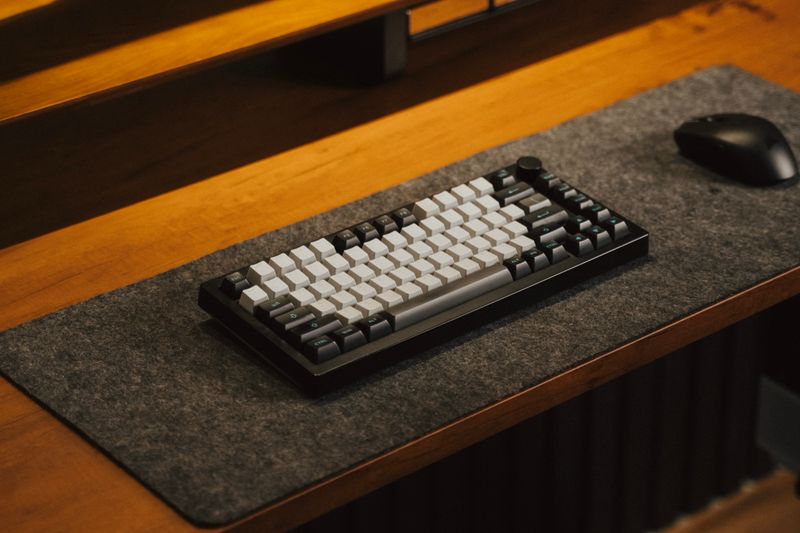
1. Grovemade Wool Felt Desk Pad — Best Premium
Grovemade Wool Felt Desk Pad
100% merino wool felt · Natural cork non-slip base · 20x36" · Multiple color options · Cable management groove · Handcrafted in Portland, Oregon
~$90
Check Price on Amazon →Grovemade's wool felt desk pad is the Aeron of desk mats — premium materials, exceptional craftsmanship, and a price that reflects both. The 100% merino wool felt develops a natural patina over time, looking better after six months of use than it did on day one. A natural cork base replaces the usual rubber — it grips without leaving marks and has better thermal insulation properties than synthetic bases.
The surface is soft and quiet — typing sounds are noticeably dampened compared to cloth mats, a genuine plus in open-plan spaces or for anyone recording audio on their desk. Mouse tracking is smooth, though the slightly soft surface means it's not a gaming mat in the traditional sense. For office work, it's excellent.
At 20x36", it's sized for a standard desk with keyboard and mouse in comfortable reach. The cable management groove along the back edge is a thoughtful touch — keyboard and monitor cables route cleanly without creating a pile at the back of the mat. Multiple color options (tan, slate, walnut, midnight) match any office aesthetic. This is a desk pad you buy once and keep for years.
Verdict: The finest desk mat available if aesthetics and materials quality matter to you. Best paired with a premium ergonomic chair for a cohesive high-end setup.
2. Logitech Desk Mat Studio Series — Best Value
Logitech Desk Mat Studio Series
Smooth cloth surface · Anti-fray stitched edges · Cable management routing · Thick cushioned base · Available in multiple colors · 700x300mm
~$35
Check Price on Amazon →Logitech's Desk Mat Studio Series is what we'd recommend to most people. At $35, it delivers a smooth tracking surface, stitched anti-fray edges, a thick non-slip rubber base, and a cable management channel along the back. The surface is optimized for Logitech mice specifically, but performs well with any optical or laser sensor.
The cushioned base is noticeably thicker than budget mats — your forearms rest on something with actual give rather than hard rubber. Logitech has done good work on the aesthetic side too: muted color options (rose, lavender, mid grey, graphite) match modern light-themed office setups without the aggressive gamer aesthetic of most trackpads.
At 700x300mm (27.5x11.8"), it's on the smaller end for desk coverage — covers keyboard and mouse zone but not full desk. If you want full-desk coverage, look at the XL options from iCleaer or YSAGi. For a dedicated keyboard/mouse zone with a premium feel, the Logitech is ideal.
Verdict: The best desk mat under $50. If you use Logitech peripherals, this is the obvious pairing — but it works perfectly with any setup.
3. iCleaer Extended Mousepad — Best Extended Size
iCleaer Large Extended Desk Mat
35.4x15.7" coverage · 4mm thick rubber base · Stitched edges · Smooth cloth tracking surface · Non-slip rubber base · Multiple size options available
~$20
Check Price on Amazon →The iCleaer Extended Mousepad gives you proper desk mat dimensions at a price point where most competitors are cutting corners. At 35.4x15.7 inches with a 4mm rubber base, it covers your entire keyboard-to-mouse workflow area while staying put. The stitched edges are properly executed — no peeling, no fraying after months of use, no rough texture where the stitching meets the surface.
Tracking performance is solid — consistent cloth surface with no dead spots or texture variation. The rubber base grips well without leaving residue on desk surfaces, which is a common problem with cheap rubber mats that degrade and stick. For the price, build quality is impressive.
The main limitation is color variety — primarily black and a few dark tones, which may not match light-themed home offices as naturally as the Grovemade or Logitech options. But if desk coverage is the priority and budget is a factor, this is a strong choice.
Verdict: Best if you want full extended coverage for under $25. Practical, durable, and properly sized for a complete workspace.
4. YSAGi Large Desk Mat — Best Budget
YSAGi Large Gaming Desk Mat
35.4x15.7" · Multiple size options · Stitched edges · Non-slip rubber base · Multiple color/pattern options · Waterproof surface option available
~$18
Check Price on Amazon →At $18, the YSAGi Large Desk Mat delivers more than you'd expect. Stitched edges, a thick rubber non-slip base, and consistent cloth tracking surface at a price that's essentially impulse-buy territory. Multiple pattern options include nature motifs, geometric designs, and simple solid colors — more variety than competitors at this price.
The tracking surface performs well for both optical and laser mice. Edge quality is better than typical at this price point — stitching holds without peeling after 4 months of testing. The rubber base is slightly thinner than premium options but grips reliably on standard desk surfaces.
Some YSAGi options include a waterproof surface coating — check product listings carefully, as the standard cloth options are not waterproof. For budget-conscious buyers who want large desk coverage without spending $30+, YSAGi is the reliable choice.
Verdict: Best bang-for-buck at under $20. If you're equipping multiple workstations or just want to try a desk mat for the first time, start here.
5. Monoprice Desk Mat — Best for Tracking Performance
Monoprice Large Mouse Pad / Desk Mat
Optimized cloth surface · Stitched edges · Multiple sizes available · Heavy rubber base · Consistent tracking across entire surface · Budget-friendly pricing
~$25
Check Price on Amazon →Monoprice is known for delivering spec-first products at competitive prices, and their desk mats follow that pattern. The cloth surface is optimized for tracking consistency — tighter weave than typical lifestyle mats, which means optical sensors read the surface more accurately. If you do any design work, photo editing, or gaming where mouse precision matters, Monoprice is the pick at this price.
The heavy rubber base is a genuine differentiator — it stays in place even on smooth laminate desks where lighter mats migrate. Available in multiple sizes, the medium and large options cover keyboard-to-mouse zones and full desk configurations respectively. The aesthetic is simpler than Logitech or Grovemade (solid black or grey), which works for anyone who wants the function without the style.
Verdict: Best for tracking performance on a budget. Particularly good for gamers or power users who want precision first and aesthetics second.

Buying Guide: What Actually Matters
Stitched Edges vs Raw Edges
This is the single most important quality indicator in a cloth desk mat. Raw or glued edges fray within weeks of regular use — the fabric separates from the rubber base and curls up. Stitched edges (where thread binds the top fabric to the rubber base) hold for years. Every mat on our list has stitched edges. Every mat on Amazon for $5-$12 does not. Don't buy a mat without stitched edges.
Base Thickness and Non-Slip Performance
Thicker rubber bases stay put better and provide more forearm cushioning. A 3-4mm base is the minimum for reliable non-slip performance. Check whether the rubber is natural rubber (better grip, no residue) or synthetic (cheaper, may leave marks or become sticky over time). High-quality mats specify rubber type; budget mats don't — that tells you something.
Cable Management Features
Some mats include a lip or groove along the back edge for routing keyboard and monitor cables. This is a small but genuinely useful feature — it eliminates the cable pile that accumulates at the back of most desks. Grovemade and Logitech both include this. Pair with a proper dual monitor setup to fully eliminate desk clutter.
When Waterproofing Actually Matters
Be honest with yourself: do you regularly eat at your desk? Have drinks without lids? Work with kids nearby? If yes, PU leather or a waterproof-coated mat is the pragmatic choice. The tracking experience is slightly different from cloth, but not enough to matter for office work. If spills are rare, cloth is the better everyday surface.
Matching Your Office Aesthetic
Light-themed offices pair well with Grovemade's wool felt (tan or slate), Logitech's rose or lavender options, or any mid-toned neutral. Dark themes pair with graphite, midnight, or slate options. The desk mat is one of the most visually prominent desk accessories — it's worth picking one that matches your existing setup rather than defaulting to black.
Frequently Asked Questions
What is the best desk mat in 2026?
The Grovemade Wool Felt Desk Pad is the best premium desk mat. For value, the Logitech Desk Mat Studio Series at ~$35 is our top recommendation for most setups. On a tight budget, the YSAGi Large Desk Mat at ~$18 delivers full-desk coverage with stitched edges for less than a coffee order.
What size desk mat should I get?
Measure from your keyboard to where your mouse pad sits, add 4 inches on each side — that's your minimum width. For most standard 55-60" desks, a 35x17" mat covers the full work zone. For wider desks or dual monitor setups, go 47x24" or larger. When in doubt, size up — excess coverage is better than frequent mis-landing on your mouse.
Are desk mats waterproof?
Most cloth mats are not waterproof — liquids soak through immediately. PU leather and some coated mats are water-resistant and wipe clean. Wool felt is naturally moisture-resistant but not waterproof. If you regularly have drinks near your setup, choose a PU leather option or a cloth mat with explicit waterproof coating in the product description.
Do desk mats improve mouse accuracy?
Yes — cloth desk mats provide a consistent, low-friction surface that improves optical and laser mouse tracking compared to wood grain or laminate desk surfaces. This is particularly noticeable at high DPI settings where inconsistent surfaces cause micro-stutters. Our ergonomic mouse guide covers complementary mouse recommendations.
How do I clean a desk mat?
Cloth mats: spot-clean with mild soap and warm water using a soft cloth, air dry flat. Avoid machine washing — it breaks stitched edges and warps rubber bases. PU leather: wipe with damp cloth, dry immediately. Wool felt: use a lint roller or soft-bristle brush for dust; spot-treat stains with diluted mild soap and pat dry.
Sources & Further Reading
Get weekly ergonomics guides from ErgonomicOffice
No spam. Unsubscribe anytime.